The CFOP method solves a 3×3 Rubik's Cube in four stages: Cross, F2L, OLL, and PLL. It is popular in speedcubing because it replaces repeated beginner-method steps with efficient pair solving and a more structured last layer.
You do not need to memorize every CFOP algorithm at once. The most reliable route is:
Cross → intuitive F2L → 2-Look OLL → 2-Look PLL → full PLL → full OLL
This guide explains what to learn at each stage, when to move forward, what usually goes wrong, and how CubeSolver tools fit into a practice routine. It is a learning path rather than a complete algorithm library; the linked case guides provide the full OLL, PLL, and F2L sets.
If your cube is in an unknown or invalid state, restore it first. Then apply a recorded scramble so that the practice solve can be repeated and reviewed.
CFOP at a Glance
Cross: Place the four bottom-layer edges and match each one with its side center. Begin by building a correct Cross; later, plan it before the timer starts and work toward efficient solutions.
F2L: Pair four white corners with their matching middle-layer edges. Begin with intuitive pairing and a few short move sequences; later, recognize common case patterns, preserve solved pairs, and reduce pauses.
OLL: Turn every last-layer sticker upward. The beginner route uses 2-Look OLL, commonly taught with 10 algorithms, while full OLL contains 57 cases.
PLL: Move the oriented last-layer pieces into their correct positions. The beginner route uses 2-Look PLL, commonly taught with 6 algorithms, while full PLL contains 21 cases.
Algorithm counts can vary slightly between learning resources because some resources count mirrored cases or alternative executions differently. What matters is using one consistent algorithm set and verifying every case on a real cube.
Choose Your CFOP Learning Path
Beginner route
Choose this route if you can solve the cube with a beginner method but are not yet comfortable pairing a corner with an edge.
- Build the Cross on the bottom.
- Learn intuitive F2L using short move sequences such as
R U R' and L' U' L.
- Learn 2-Look OLL so the last layer becomes one color in two recognition steps.
- Learn 2-Look PLL so the last-layer pieces reach their correct positions in two recognition steps.
- Practice complete solves before adding more algorithms.
This route keeps the initial memory load manageable. It is better to execute a small set accurately than to know many algorithms that you cannot recognize under time pressure.
Advanced route
Move to this route when your beginner CFOP solve is consistent and pauses—not raw turning speed—are the main reason you lose time.
- Plan the entire Cross during the observation time before the solve, known as inspection.
- Improve F2L efficiency, preserve solved pairs, reduce rotations, and track the next pair while turning.
- Learn full PLL before full OLL; 21 PLL cases usually offer a practical improvement for a smaller memory load.
- Learn full OLL in manageable case groups.
- Refine finger movements and transitions without sacrificing accuracy.
Do not treat full OLL or full PLL as a substitute for good F2L. For many developing solvers, long pauses between F2L pairs cost more time than using a two-look last layer.
Before You Start
You should already be able to complete a 3×3 cube with a beginner method. You should also understand basic notation:
R, L, U, D, F, and B turn the Right, Left, Up, Down, Front, and Back faces clockwise when that face is viewed directly.- An apostrophe means a counterclockwise turn, such as
R'.
- A
2 means a 180-degree turn, such as U2.
Keep the same color scheme throughout your practice. This guide uses a white Cross and a yellow last layer.
Several speedcubing terms appear throughout the guide:
- Inspection is the observation time before the solve begins.
- A trigger is a short move sequence that appears in many algorithms.
- Lookahead means searching for the next pieces while the current pair is still being inserted.
- A regrip is a change in hand position made to continue an algorithm.
Stage 1: Build the Cross
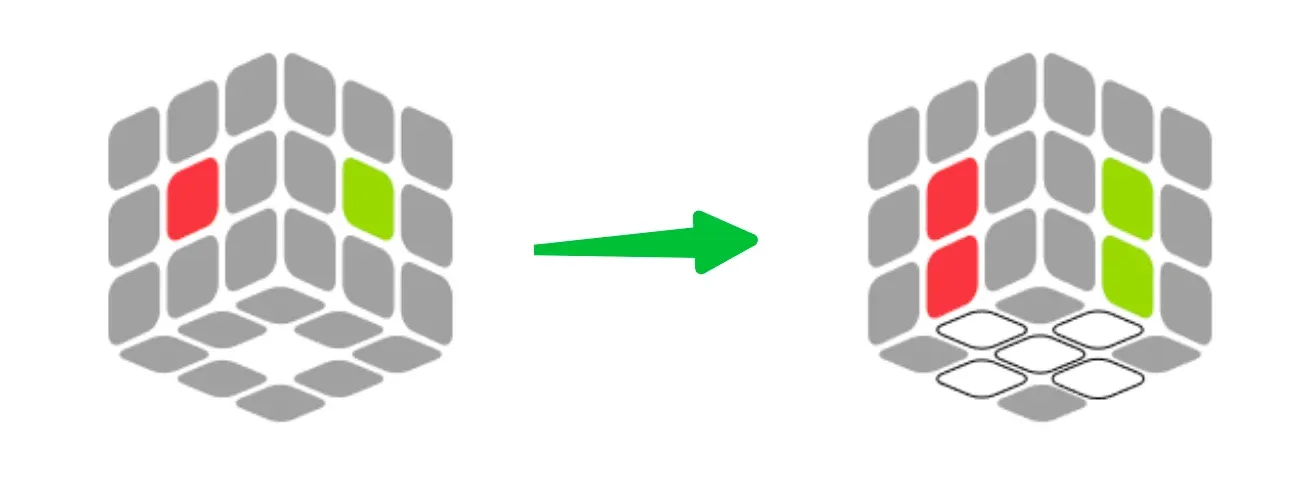
The Cross solves the four white edge pieces around the white center while matching each edge's side color with its center. A white plus sign is not enough: all four side colors must also align.
When to learn it
Start Cross training as soon as you can solve the cube with a beginner method. Cross requires no fixed algorithm set, so it is the best place to begin reducing moves and unnecessary rotations.
Beginner Cross process
- Find all four white edge pieces.
- Identify the second color on each edge.
- Move each edge to the bottom while protecting pieces already solved.
- Check the four side centers before moving to F2L.
For example, the white-red edge belongs between the white and red centers. If the white face looks solved but the red sticker does not match the red center, the Cross is not complete.
A slower explanation of edge placement and center alignment appears in the step-by-step White Cross tutorial.
Advanced Cross planning
Once you can build the Cross reliably:
- Solve it on the bottom instead of building it on top and rotating the cube.
- During inspection, locate all four Cross edges before you begin.
- First plan two or three edges, then work toward planning all four.
- Count moves after the solve; eight moves or fewer is a useful training target, not a requirement for every scramble.
- Look for moves that place or preserve more than one Cross edge.
Common Cross failures
The white plus is complete, but the side colors do not match. One or more edges are in the wrong Cross position. Check all four side stickers against their centers before beginning F2L.
The Cross takes too many moves. Solving every edge independently creates extra setup moves. Plan the edge order and look for turns that place or preserve more than one edge.
There is a long pause before F2L. The Cross was completed without tracking a first pair. During the final Cross moves, begin looking for one F2L corner or edge.
Solved edges keep breaking. New pieces are moving through occupied Cross positions. Choose setup moves that protect the completed edges or restore them immediately.
Stage 2: Solve F2L Pairs
F2L, or First Two Layers, pairs each white corner with its matching middle-layer edge and inserts both pieces into one slot. Four pairs complete the first two layers.
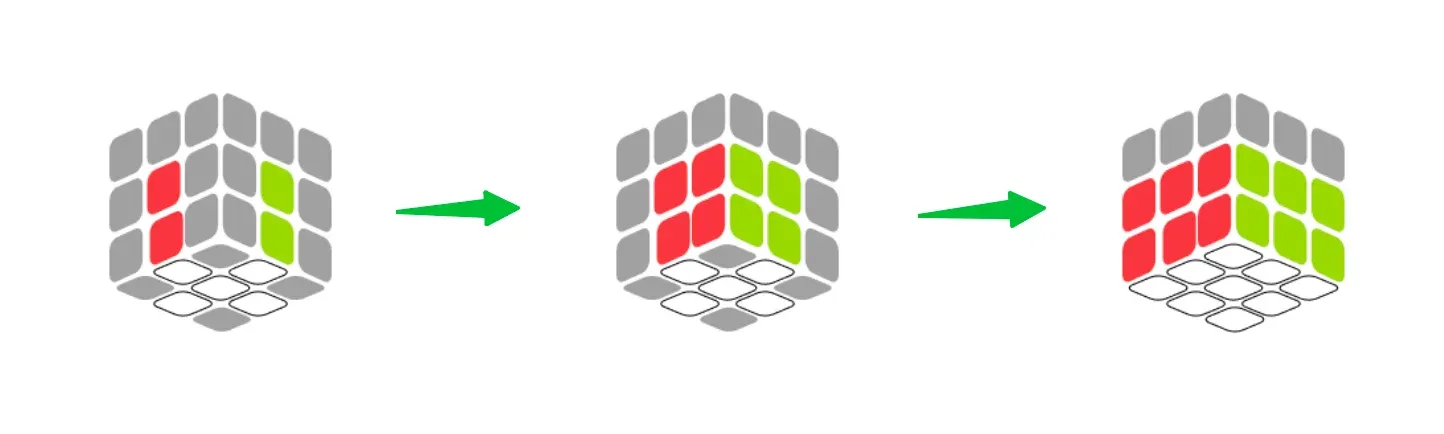
For a white-red-green corner, the matching edge is red-green. Those two pieces belong in the slot between the red and green centers.
When to learn it
Begin intuitive F2L when you can solve a correct Cross consistently. Do not wait until your Cross is fast. Early F2L practice teaches piece tracking and makes later lookahead training easier.
How much to memorize
There are 41 standard F2L cases, but a beginner does not need 41 isolated algorithms. First learn how to:
- Find a corner and its matching edge.
- Move both pieces to the top layer without breaking the Cross.
- Separate pieces that are connected incorrectly.
- Pair them with basic right- or left-handed triggers.
- Insert the pair into the correct slot.
A common right-slot trigger is R U R'. Its left-slot mirror is L' U' L. These are building blocks, not universal solutions for every F2L case.
A repeatable F2L practice case
This controlled drill demonstrates how a short setup and insertion sequence relate to each other:
- Begin with a solved cube, with white on the bottom and yellow on top.
- Apply
R U R' U' once. This removes the front-right corner-edge pair from its solved slot and places the pieces in the top layer.
- Keep the same cube orientation. Apply
U R U' R'.
- Check the front-right slot. The corner and edge should be restored without disturbing the other three F2L slots.
The second sequence is the exact inverse of the first, so this is a repeatable drill rather than a solution for every F2L position. Once the movement feels natural, compare the top-layer pieces before and after the insertion and identify why they return to the front-right slot.
Specific cases, alternate solutions, and rotation-saving options are compared in the F2L algorithms guide.
F2L progression
Level 1 — Correct pairing: Solve one corner-edge pair at a time without breaking the Cross.
Level 2 — Fewer rotations: Use U, U', or U2 to bring pairs to workable positions before rotating the entire cube.
Level 3 — Preserve solved pairs: Avoid inserting or extracting through a completed slot unless the sequence restores it.
Level 4 — Lookahead: Turn at a controlled speed and track the next pair while inserting the current one.
Common F2L failures
The corner and edge have matching colors but will not insert together. They are paired in the wrong orientation. Separate them on the top layer, change their relative position, and rebuild the pair.
A solved pair breaks. The next case is being solved through an occupied slot. Move the working pair above an empty slot or choose a sequence that restores the solved pair.
The cube is rotated too often. Every case is being forced into the front-right slot. Learn left-slot insertions and try U-layer setup moves before rotating the entire cube.
There are long pauses between pairs. The current pair is receiving all of your attention during insertion. Turn more slowly and search for the next corner or edge during the final moves.
F2L feels slower than the beginner method. Recognition is still new. Practice untimed solves and measure pauses separately from execution speed.
Stage 3: Orient the Last Layer with OLL
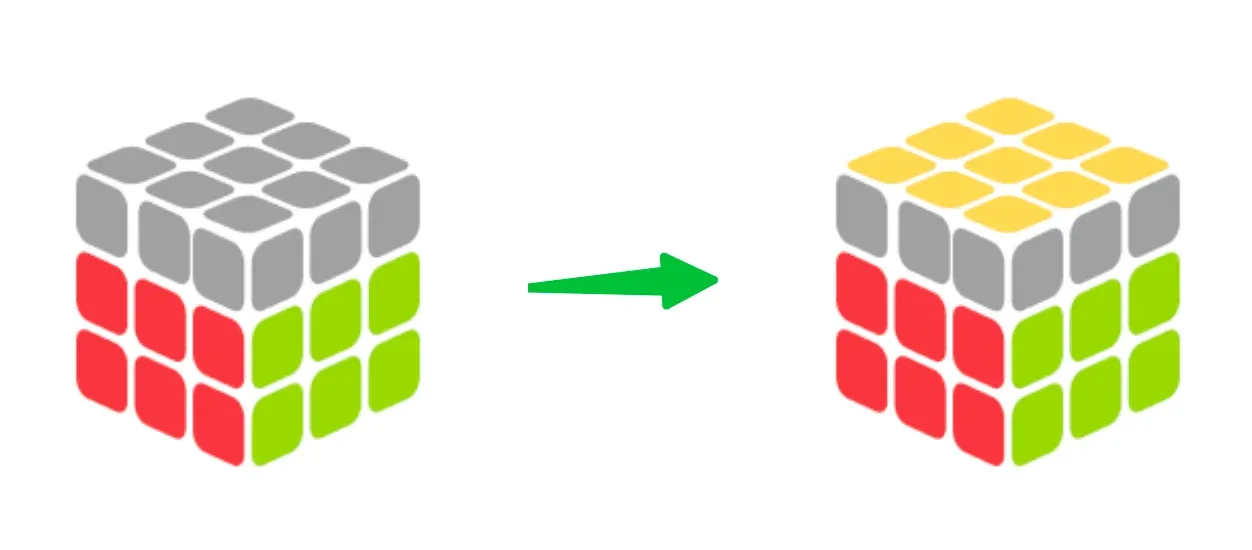
OLL, or Orientation of the Last Layer, turns every last-layer sticker upward without requiring the pieces to be in their final positions. With a white Cross, the last layer is normally yellow.
When to learn it
Start 2-Look OLL after you can complete all four F2L pairs without returning to a beginner layer-by-layer process. Learn full OLL only after your recognition is reliable and additional algorithms will not displace more valuable F2L practice.
Beginner route: 2-Look OLL
2-Look OLL separates orientation into two tasks:
- Orient the four last-layer edges to make a yellow Cross.
- Orient the four corners to make the entire top face yellow.
This approach is commonly taught with 10 algorithms. Learn the holding angle together with each algorithm. Executing the correct moves from the wrong angle produces a different case and makes the solve feel unpredictable.
The complete beginner set, including recognition diagrams and verified sequences, is organized in the 2-Look OLL guide.
Advanced route: full OLL
Full OLL contains 57 cases and orients the complete last layer in one algorithm. Learn cases in visually related groups rather than in an arbitrary list. For each case, record:
- The recognition cue you see from the top and front.
- The required holding angle.
- The algorithm you will use consistently.
- The finger movement sequence that avoids regrips.
- A similar case that you might confuse with it.
All 57 patterns are organized as a dedicated case library in the complete OLL algorithms guide.
Common OLL failures
The algorithm creates the wrong yellow pattern. The case or holding angle was misidentified. Check both the top stickers and the yellow stickers facing the sides before beginning.
The algorithm takes several seconds to remember. Recall is tied to the case name rather than its visual pattern. Practice identifying the case without performing any moves.
The last layer becomes scrambled beyond recognition. A move was probably omitted or reversed. Verify the notation, rebuild the same case, and execute it slowly.
New OLL cases increase the total solve time. Too many cases were added at once. Learn a small visual group and continue reviewing the algorithms already in memory.
Stage 4: Permute the Last Layer with PLL
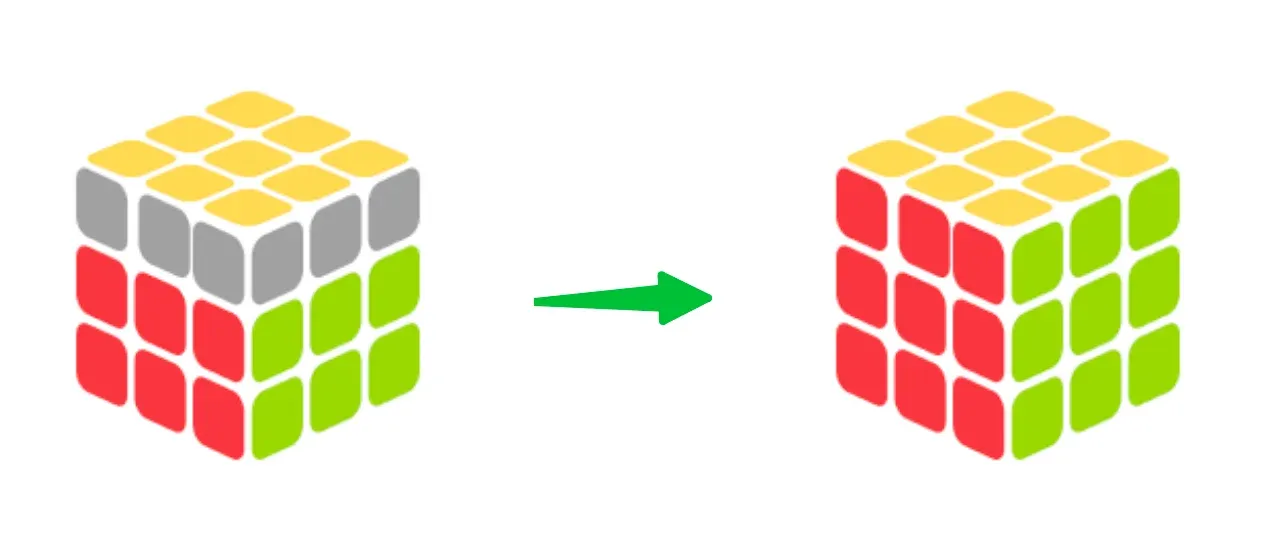
PLL, or Permutation of the Last Layer, moves the already oriented last-layer pieces into their correct positions. The yellow face remains oriented while corners and edges cycle around it.
When to learn it
Start 2-Look PLL as soon as you can orient the last layer consistently. Many learners then move to full PLL before full OLL because the complete PLL set contains 21 cases and directly removes an extra recognition-and-execution step.
Beginner route: 2-Look PLL
2-Look PLL divides permutation into:
- Put the four corners in their correct positions.
- Put the four edges in their correct positions.
It is commonly taught with 6 algorithms. The final U, U', or U2 alignment is called AUF—Adjustment of the U Face—and is part of completing the solve.
Recognition cues and verified sequences for the beginner set are grouped in the 2-Look PLL guide.
Advanced route: full PLL
Full PLL contains 21 cases. Recognition depends on side patterns, not only the stickers visible on top. A block is a group of adjacent pieces whose side colors already match. Headlights are two same-colored corner stickers facing the same side.
Learn one reliable algorithm for each case before comparing alternatives. A sequence with fewer moves is not automatically faster if it causes rotations, regrips, or frequent execution errors.
The complete PLL algorithms guide groups all 21 cases with the side patterns needed to distinguish them.
Common PLL failures
The yellow face stays complete, but the cube is not solved. The wrong PLL case or holding angle was chosen. Identify blocks and headlights on the side faces before executing.
The algorithm ends one U turn away from solved. AUF was not completed. Compare the side centers and finish with U, U', or U2.
Two PLL cases look identical. Recognition is based on only one face. Check at least two adjacent sides before deciding on the case.
Fast execution causes lockups. Finger movements are inconsistent. Practice the sequence slowly and increase speed only after several clean repetitions.
Diagnose Where Your CFOP Solve Loses Time
Do not assume that the stage with the most algorithms is automatically your largest weakness. Record splits or review a video of several solves.
| Observation |
Likely priority |
What to practice |
| Long pause before the first turn |
Cross planning |
Locate and order Cross edges during inspection |
| Cross is complete but first F2L pair is hard to find |
Cross-to-F2L transition |
Track one corner or edge during the final Cross moves |
| Frequent pauses between F2L pairs |
Lookahead |
Slow turning, pair tracking, and untimed solves |
| Many cube rotations during F2L |
Case handling |
Left-slot solutions, U-layer setup moves, and back-slot awareness |
| OLL/PLL recognition is slow but execution is accurate |
Recognition |
Flashcard-style case identification without performing moves |
| Algorithms frequently fail |
Execution accuracy |
Verify notation and holding angle; drill at a controllable speed |
Practice CFOP with CubeSolver Tools
Measure complete solves with Cube Timer
Scrambles and complete-solve records from the Cube Timer make it possible to compare averages such as Ao5 and Ao12 instead of judging progress from one unusually good or bad result.
For focused training, add a short note after each solve: Cross planning failure, F2L pause, OLL recognition, PLL recognition, or execution error. This turns a time into a diagnosis.
Rehearse algorithms in Cube Simulator
Notation checks and slow algorithm repetitions are easier in the interactive Cube Simulator, where two sequences can be compared without repeatedly setting up a physical cube.
Recover and inspect a difficult cube state
If an algorithm error leaves the physical cube in an unfamiliar state, the Online Rubik's Cube Solver can reconstruct a recovery path from its current colors. After the cube is restored, recreating the original training case helps isolate the move that failed.
The solver is a recovery and diagnostic tool; it does not replace recognition practice or learning why a CFOP pair belongs in a specific slot.
A Focused 30-Minute CFOP Practice Session
- Cross planning — 5 minutes: Inspect several scrambles without turning. Plan two Cross edges at first, then increase the number only when the plan remains accurate.
- F2L drill — 10 minutes: Practice one pair type or one recurring mistake. Favor correct pairing and low rotation count over speed.
- Last-layer recognition — 5 minutes: Identify OLL or PLL cases before performing their algorithms. Include the holding angle in every answer.
- Complete solves — 10 minutes: Record several timed solves and label the largest pause in each one. The weakness that appears most often becomes the focus of the next session.
CFOP FAQ
Is CFOP suitable for beginners?
CFOP is suitable for someone who can already complete a 3×3 cube with a beginner method. Start with intuitive F2L and two-look last-layer methods instead of trying to memorize full OLL and PLL immediately.
Should I learn full OLL or full PLL first?
For most learners, full PLL is the more manageable first step because it contains 21 cases, compared with 57 OLL cases. However, F2L consistency and recognition may still be a higher priority than either set.
What is usually the hardest part of CFOP?
F2L is often the longest stage and requires continuous recognition rather than one memorised sequence. Learners commonly lose time by searching for pieces, rotating the cube, or watching a pair after they have started inserting it.
Why am I slower after switching to CFOP?
New F2L recognition and last-layer algorithms introduce pauses. This is normal. Practice untimed solves, prioritize correct recognition, and compare averages over several weeks rather than expecting an immediate personal best.
Is CFOP always faster than ZZ or Roux?
No method guarantees a faster solve for every person. CFOP has extensive learning resources and a large algorithm ecosystem, while ZZ and Roux emphasize different move sets and solving strategies. Execution quality and practice matter more than the method name alone.
Build Your Next Practice Session
If you are new to CFOP, follow the same progression developed throughout this guide: a correctly aligned Cross, intuitive F2L, 2-Look OLL, and 2-Look PLL.
If you already use beginner CFOP, follow the focused 30-minute session above and compare the notes from several complete solves.
CFOP improvement is not simply the number of algorithms you know. A correct Cross, efficient pairs, reliable recognition, and smooth transitions turn four separate stages into one continuous solve.